...

ProCapture - Professional Screenshot Tool

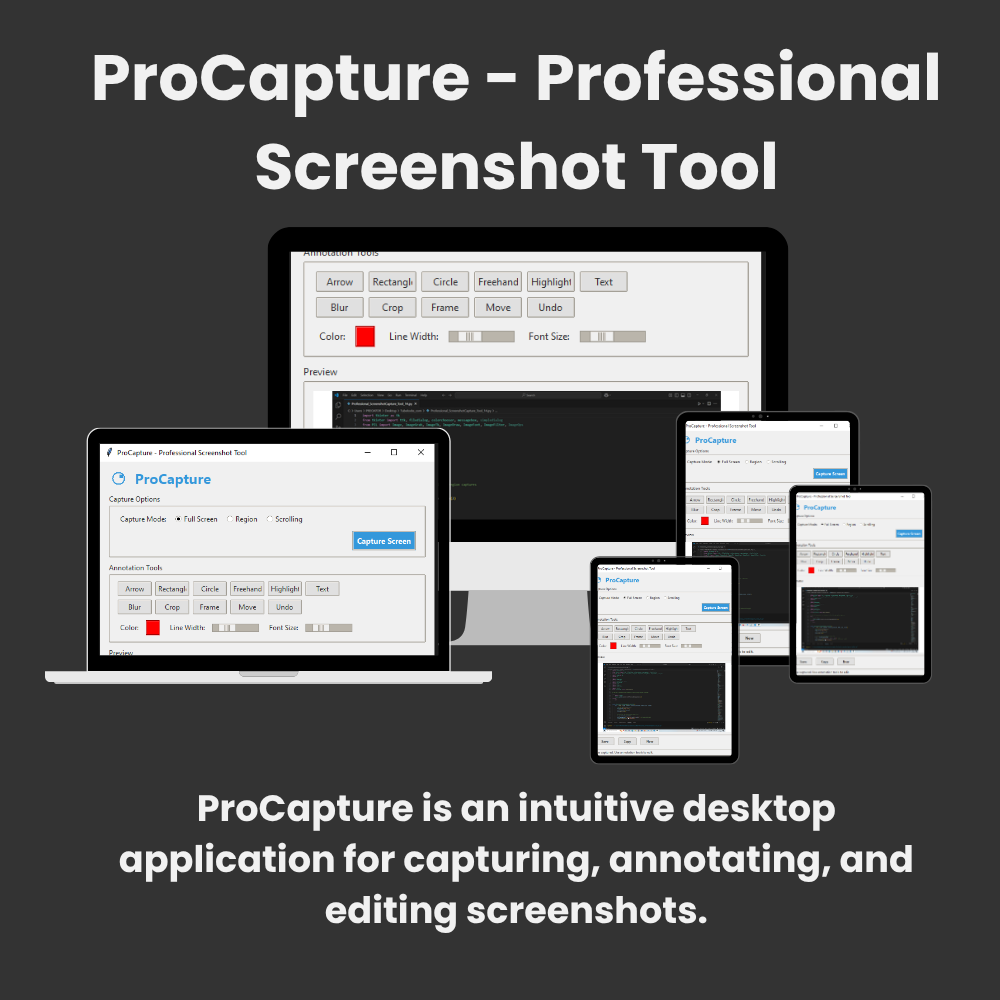
ProCapture is an intuitive desktop application for capturing, annotating, and editing screenshots. It supports full-screen, region-based, and scrolling captures, with robust annotation tools for adding arrows, shapes, text, blur effects, and frames. Edited screenshots can be saved or copied directly to your clipboard.

User Capabilities

  • ✅ Capture Modes:

    • Full screen

    • Custom regions

    • Scrolling windows (e.g., long web pages)

  • 🖌️ Annotation Tools:

    • Arrows, rectangles, circles, freehand drawing

    • Text boxes with customizable fonts/colors

    • Highlighting and blurring tools

    • Decorative frames

  • ✂️ Editing Features:

    • Crop images

    • Move/resize annotations

    • Undo edits

  • 💾 Export Options:

    • Save as PNG/JPEG

    • Copy to clipboard

Who Can Use This Software?

  • 👩‍💻 Professionals creating tutorials/documentation

  • 👨‍🏫 Educators designing course materials

  • 🛠️ Support teams highlighting UI issues

  • 📊 Content creators for social media/blog graphics

    Protecting Sensitive Content 

    To hide sensitive info in screenshots:

    1. Click the Blur tool

    2. Drag over private areas (e.g., emails, passwords)

    3. Release mouse → Area becomes pixelated

    4. Result: Permanently obscured data in saved images

💳 Pricing Plans

Lifetime Plan – ₹ 2499 

For creators and professionals who need full control.

  • ✅ Capture Modes:

    • Full screen

    • Custom regions

    • Scrolling windows (e.g., long web pages)

  • 🖌️ Annotation Tools:

    • Arrows, rectangles, circles, freehand drawing

    • Text boxes with customizable fonts/colors

    • Highlighting and blurring tools

    • Decorative frames

  • ✂️ Editing Features:

    • Crop images

    • Move/resize annotations

    • Undo edits

  • 💾 Export Options:

    • Save as PNG/JPEG

    • Copy to clipboard

🔸 Basic Plan – ₹ 150 /Month

For creators and professionals who need full control.

  • ✅ Capture Modes:

    • Full screen

    • Custom regions

    • Scrolling windows (e.g., long web pages)

  • 🖌️ Annotation Tools:

    • Arrows, rectangles, circles, freehand drawing

    • Text boxes with customizable fonts/colors

    • Highlighting and blurring tools

    • Decorative frames

  • ✂️ Editing Features:

    • Crop images

    • Move/resize annotations

    • Undo edits

  • 💾 Export Options:

    • Save as PNG/JPEG

    • Copy to clipboard

🔶 Pro+ Plan – ₹ 1260 / 12 Months (Save 30%)

Ideal for regular users and small businesses.
Includes everything in Pro Plan, plus:

  • ✅ Capture Modes:

    • Full screen

    • Custom regions

    • Scrolling windows (e.g., long web pages)

  • 🖌️ Annotation Tools:

    • Arrows, rectangles, circles, freehand drawing

    • Text boxes with customizable fonts/colors

    • Highlighting and blurring tools

    • Decorative frames

  • ✂️ Editing Features:

    • Crop images

    • Move/resize annotations

    • Undo edits

  • 💾 Export Options:

    • Save as PNG/JPEG

    • Copy to clipboard

Why Users Like ProCapture

  • 🚀 All-in-One Workflow: Capture → Annotate → Export in one tool

  • ⚡ Scrolling Capture: Auto-stitches long web pages

  • 🎨 Customization: Control colors, line widths, and fonts

  • 📋 Clipboard Support: Instantly paste into emails/docs

  • 💻 Lightweight: No installation needed (run directly from source)

deepseek mermaid 20250717 0947b8
Seraphinite AcceleratorOptimized by Seraphinite Accelerator
Turns on site high speed to be attractive for people and search engines.